Menu
Your Basket

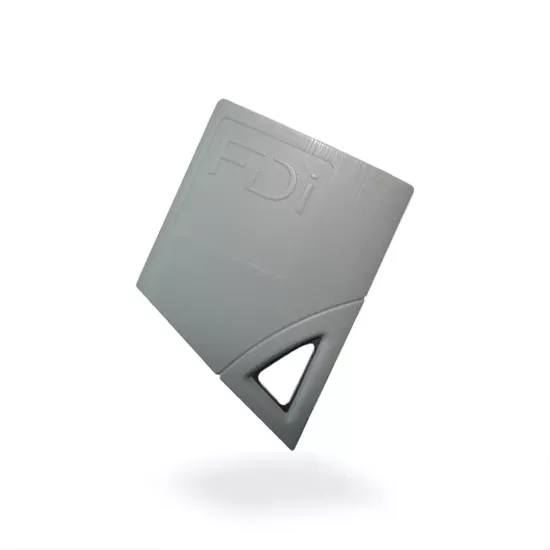
Urmet Proximity Key fob single fob - U1125-50

Urmet Proximity Key fob single fob - U1125-50
Part Number: U1125-50
  • Stock: In Stock
£9.20

Free Expert Advice From A Member of Our Expert Team

Same Day Dispatch on Stock Orders Placed Before 2.30pm

Free & Fast UK Delivery on All Orders Over £150

Urmet 1125/50 Proximity Key Fob Overview

The Urmet 1125/50 is the 125kHz proximity key for Urmet’s legacy Transit and Passan door entry systems, and it also works with older IPerVoice installations. This single fob is the practical option when a building needs one replacement key or one new resident added to the system.

  • Urmet part code: 1125/50 (AddACard ref: U1125-50)
  • Technology: 125kHz RFID proximity key
  • Supplied as: single key fob
  • Compatible systems: Urmet Transit, Passan and older IPerVoice (1103/3, 1103/2, 1148/45 and 1158/45)

Each fob carries its own serial number. The user presents it to the reader on the entry panel, and the door controller checks it against the keys it has been told to accept before releasing the door. It's a simple way to add a single user to your building's access control system.

Checking Your Existing Urmet Fob First

Urmet has changed its fob technology over the years, so the fob on your keyring may look different from the one pictured here. According to Urmet, the early black or grey teardrop-shaped fobs are usually 125kHz, and the 1125/50 replaces them. A small number of those teardrop fobs ran at 13.56MHz, though, so you can’t go by shape alone.

The back of the fob is the quickest way to tell. Urmet’s 13.56MHz MIFARE fobs carry a hexadecimal code on the back. The 1356/10 MIFARE Classic fob has eight digits, and the 1356/11 MIFARE Plus fob has 14 digits and a + symbol on the front. If you see either of those, your system needs a 13.56MHz key and the 1125/50 won’t read. Urmet asks for a photo of both the fob and the door controller before it confirms a replacement, and that’s a sensible check to make on site before you order.

Which Urmet Systems Use MIFARE Instead

Urmet’s newer systems use 13.56MHz MIFARE technology. Easy Door, IPassan and Transit+ all run on the 1356/11 MIFARE Plus keys, which some distributors list as FDI MIFARE Plus tokens. Newer IPerVoice systems use the 1356/10 MIFARE Classic fob. Urmet lists Passan as compatible with both the 1125/50 and the 1356/10, so check the existing fob on any Passan door before ordering.

The Easy Door controller also handles keys differently. Each key is encoded at the office through Urmet’s web software and an encoder, and it carries access changes to the doors as it’s used.

Adding a New Key to a Transit Controller

On a Transit system, you add a new key at the controller itself. Use the arrow buttons to find a free memory position, present the fob to the symbol beside the display, then confirm once all three dots are lit. Urmet recommends recording each key’s serial number next to the flat it’s issued to. When a resident moves out or loses a fob, you’ll know exactly which memory position to clear, and every other key in the building keeps working.

On IPerVoice, key management runs through the IPerVoice software. Each reader is linked to a door there and added to the access profiles that need it.

Reviews

Write a review

Bad Good